Missed Blocks Checker
The Missed Blocks Checker tool monitors all validators to track missed blocks and reports them to your chosen contacts. It also keeps you updated on other validator activities, such as tombstone events, jailing, and unjailing.
PostgreSQL as Requirement
For the best experience with Missed Blocks Checker, it's recommended to install PostgreSQL. It's a robust, service-based database that's well-suited for production environments.
Install PostgreSQL
To install PostgreSQL along with additional utilities provided by the postgresql-contrib package, run the following command:
sudo apt update
sudo apt install postgresql postgresql-contrib
Start and Enable PostgreSQL Service
After installation, the PostgreSQL service usually starts automatically. To check its status, use:
sudo systemctl status postgresql
If the service is not running, you can start it with:
sudo systemctl start postgresql
To ensure PostgreSQL starts automatically on system boot, run:
sudo systemctl enable postgresql
Secure PostgreSQL
By default, PostgreSQL creates a user named postgres with full administrative privileges. For security, it's recommended to set a password for this user. Follow these steps:
Switch to the postgres user:
sudo -i -u postgres
Access the PostgreSQL prompt:
psql
Set a password for the postgres user:
\password postgres
Exit the PostgreSQL prompt by typing:
\q
Add Postgres user to ADM group
Add the postgres user to the adm group
sudo usermod -a -G adm postgres
Grant execute permission for other on /home/sentinel This allows users other than sentinel to traverse the directory.
sudo chmod o+x /home/sentinel
Test Access for postgres user if it can access the binary:
sudo -u postgres /home/sentinel/missed-blocks-checker/missed-blocks-checker --version
Create a Database and Test the Connection
Now that the postgres user is secured, you can create a new database:
CREATE DATABASE missed_db;
Exit the PostgreSQL prompt:
\q
Test the connection to your new database:
psql -d missed_db -U postgres
If the connection is successful, you're now connected to your new database using the postgres user.
Download & Installation
Now that PostgreSQL is installed, clone the Missed Blocks Checker repository on your validator and compile the binary. Make sure you have Go installed before proceeding.
git clone https://github.com/QuokkaStake/missed-blocks-checker
cd missed-blocks-checker
make build
Add a symbolic link to the /usr/local/bin/ directory for system-wide access to Missed BLocks Checker:
sudo ln -s /home/${USER}/missed-blocks-checker/missed-blocks-checker /usr/local/bin/
Create a Telegram Bot
To use the Missed Blocks Checker on Telegram, you first need to create a bot. You can do this using Telegram’s BotFather. For example, you could create a bot named @my_validator_missed_blocks.
Once the bot is created, make sure to save the following details:
- Token: This is a unique identifier tied to your bot’s name
- Chat ID: To get your chat ID, use the chatIDrobot bot
You’ll need both the Token and Chat ID to set them up in the config.toml file in the next step.
Create a Config file
Inside your missed-blocks-checker directory create the config file:
nano config.toml
Paste the following code in it making sure to edit the fields between < and > characters
config.toml
# Log configuration
[log]
# Logging level. Set it to "debug" or even "trace" to see more logs, or "warn" or even "error"
# to reduce the logs amount. Defaults to "info".
level = "info"
# If set to true, the app with display logs in JSON, which is handy if you are using
# a logging solution like Loki or Elastic stack. Defaults to false.
json = false

# Database configuration
[database]
# Type of the database. Currently supported DB types are: postgres, sqlite.
type = "postgres"
# Where the database will be stored.
# If it's a PostgreSQL database, a connection string is expected (like postgres://user:password@host:port/database)
# If it's a SQLite database, a path to the file storing a database is expected.
path = "postgres://postgres:<your_password>>@localhost:5432/missed_db"

# Prometheus metrics configuration
[metrics]
# Whether to enable metrics. If yes, a web server will be spawned at listen-addr,
# and you can query metrics by fetching "<listen-addr>/metrics", or set a Prometheus
# to scrape it. It's useful, and you can build alerts to see if anything is going wrong.
# Defaults to true
enabled = true
# Metrics webserver listen address. Defaults to ":9570".
listen-addr = ":9570"

# Chains configuration. You need at least 1 chain.
[[chains]]
# Chain codename, used in metrics.
name = "sentinel"
# Chain pretty name. Used in Telegram commands or other places. The app will use fallback
# to name if it's not provided.
pretty-name = "Sentinel"
# RPC endpoints. Need at least 1. Better to have many, so the app would work in case one is down.
rpc-endpoints = [
    "https://rpc-sentinel.busurnode.com:443",
    "https://rpc.sentineldao.com:443",
    "https://rpc.sentinel.quokkastake.io:443"
]
# Telegram reporter configuration. Needs token and chat. See README.md on how to set it up
telegram = { token = "<your_telegram_token>", chat = <your_telegram_chat_id> }
# Discord reporter configuration. Needs token, server ID (aka guild) and channel ID.
# See README.md on how to set it up.
discord = { token = "xxx", guild = "12345", channel = "67890" }
# Explorer configuration, to generate links to validators.
# Currently supported explorers are: Mintscan and Ping.pub, but you can use
# a custom link pattern to generate custom links.
# This chain configuration uses Mintscan, see below for Ping.pub and custom explorers.
# If it's omitted, no links will be generated and everything will be in plain text.
explorer = { mintscan-prefix = "sent" }
# How much blocks to store. This should be more than blocks window, as otherwise
# the app would never be able to generate reports as there's always not enough blocks
# to calculate missed blocks counter. Optimal would be to store at least 2x blocks
# of the blocks window. Defaults to 20000 (2x from 10k blocks window).
store-blocks = 20000
# Blocks window to calculate missed blocks counter against. Defaults to 10000.
blocks-window = 10000
# How much blocks a validator needs to sign in any specific window. Defaults to 0.05 (5%)
min-signed-per-window = 0.05
# Reporting thresholds.
# This is an array of percent thresholds for missed blocks groups.
# For example, if it's [0, 50, 100], there are 2 groups: from 0% to 50% and from 50% to 100%
# of missed blocks. An event is going to be sent once a validator's missed blocks count moves
# from one group to another.
# Should be an array of at least 2 values (2 values mean 1 group), the first value
# should be always 0 (as in 0%, the last value should always be 100 (as in 100%).
# Defaults to [0, 0.5, 1, 5, 10, 25, 50, 75, 90, 100]
thresholds = [0, 5, 10, 25, 50, 75, 100]
# An emoji that's going to appear in the message when a validator **enters** this group
# (for example, when a validator is missing blocks and its missed blocks counter moves from one group
# to another).
# This and emoji-end arrays' length should be equal to the amount of missed blocks group
# (so if you have 3 thresholds, you have 2 groups, so these arrays both should have 2 values).
# Defaults to ["🟡", "🟡", "🟡", "🟠", "🟠", "🟠", "🔴", "🔴", "🔴"]
emoji-start = ["🟡", "🟡", "🟠", "🟠", "🔴", "🔴"]
# An emoji that's going to appear in the message when a validator **leaves** this group
# (for example, when a validator is recovering and its missed blocks counter moves from one group
# to another).
# This and emoji-end arrays' length should be equal to the amount of missed blocks group
# (so if you have 3 thresholds, you have 2 groups, so these arrays both should have 2 values).
# Defaults to ["🟡", "🟡", "🟡", "🟠", "🟠", "🟠", "🔴", "🔴", "🔴"]
emoji-start = ["🟡", "🟡", "🟠", "🟠", "🔴", "🔴"]
# An emoji that's going to appear in the message when a validator **leaves** this group
# (for example, when a validator is recovering and its missed blocks counter moves from one group
# to another).
# Defaults to ["🟢", "🟡", "🟡", "🟡", "🟡", "🟠", "🟠", "🟠", "🟠"]
emoji-end = ["🟢", "🟡", "🟡", "🟠", "🟠", "🟠"]
# Minimal interval between two snapshots to be reported.
# For example, if a snapshot was generated at block 10, and snapshot-interval is 5,
# then the next snapshot would be done on block 15 or later (if there were errors processing it/fetching datat).
# Defaults to 1, so every block.
snapshots-interval = 10
# Periodical intervals check params. You can omit this completely, or some fields inside and the default
# ones will be used.
[chains.intervals]
# Interval to fetch blocks missed in the local state from chain.
# Setting it to 0 would disable automatic blocks fetching, which is not desired.
# You can set it to something smaller if your websocket connection is lagging.
# Defaults to 30.
blocks = 30
# Interval to fetch slashing params from chain. Set to 0 to disable fetching slashing params from chain
# and use local blocks-window and min-signed-per-window.
# Defaults to 300.
slashing-params = 300
# Interval to fetch soft opt-out threshold from consumer chain.
# (e.g. how much of voting power should sign blocks).
# Set to 0 to disable and use local threshold.
# This param is not used for sovereign chains.
# Defaults to 300.
soft-opt-out-threshold = 300
# Interval to trim local database. Set it to 0 to disable database trimming.
# Defaults to 300.
trim = 300
# Queries pagination params.You can omit this completely, or some fields inside and the default
# ones will be used.
[chains.pagination]
# How many blocks to query at once.
# Defaults to 100.
# Decrease it if the node you're querying has rate limiting and doing too many requests at once
# causes some requests to fail
blocks-search = 100
# How many validators to query at once.
validators-list = 1000
# How many signing infos to query at once.
signing-infos = 1000
Add a system unit file
Create the .service file with a text editor
sudo nano /etc/systemd/system/missed-blocks-checker.service
Paste the below text
missed-blocks-checker.service
[Unit]
Description=Missed Blocks Checker
After=network-online.target

[Service]
User=postgres
TimeoutStartSec=0
CPUWeight=95
IOWeight=95
ExecStart=missed-blocks-checker --config /home/sentinel/missed-blocks-checker/config.toml
Restart=always
RestartSec=2
LimitNOFILE=800000
KillSignal=SIGTERM

[Install]
WantedBy=multi-user.target
Reload the systemd Daemon
sudo systemctl daemon-reload
Enable autostart of Missed Blocks Checker service
sudo systemctl enable missed-blocks-checker.service
Start Missed Blocks Checker service
sudo systemctl start missed-blocks-checker.service
Use this command to check logs in real time
sudo journalctl -u missed-blocks-checker.service -f --output cat
Verify the Setup
If everything is set up correctly, you should see the PostgreSQL database initialized and the tool up and running within a few minutes.
Usage
After completing the installation, simply open your Telegram bot @my_validator_missed_blocks. Click on /start, and you'll see the following menu:
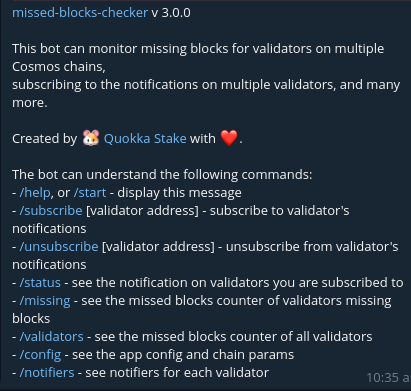
That's it! You're all set to begin.